


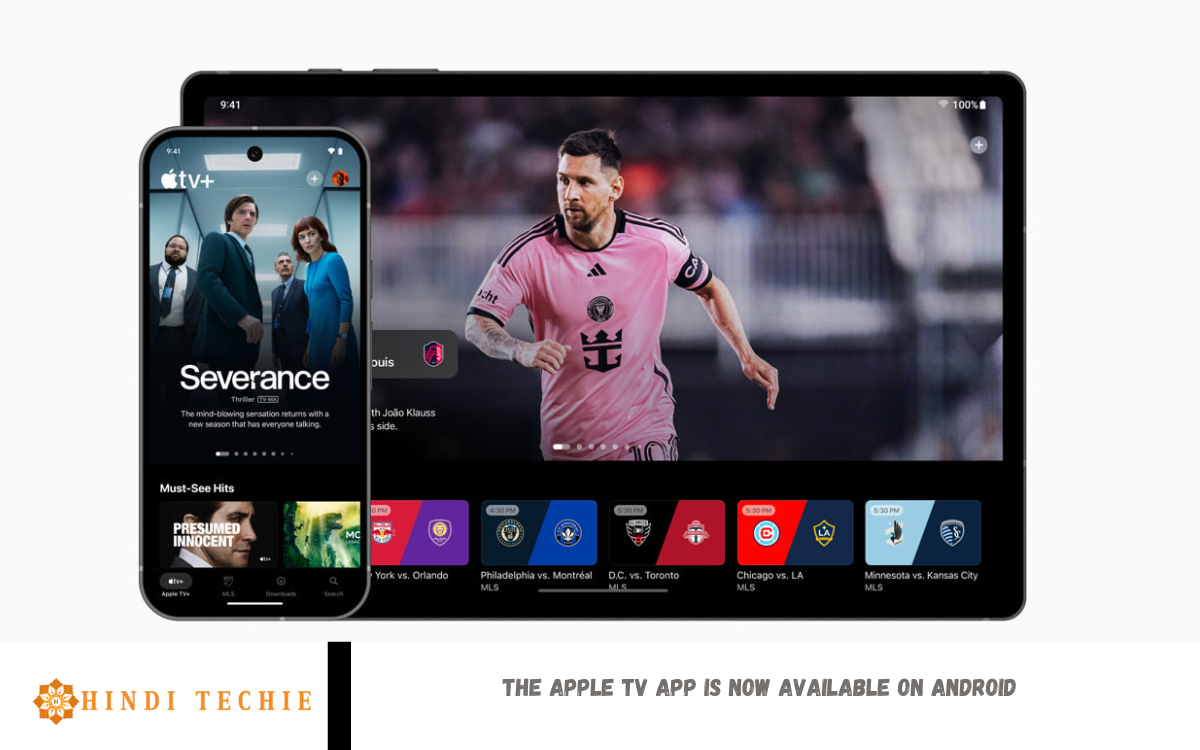
Apple has officially launched the Apple TV app for Android smartphones, marking a significant step in making its entertainment platform more accessible across different devices. Previously limited to Apple products, smart TVs, and select streaming devices, the app’s arrival on Android brings a new level of convenience for users who enjoy Apple’s rich content library but don’t own Apple hardware.
With the Apple TV app, Android users can now stream their favorite Apple TV+ shows and movies, including popular originals like Ted Lasso, The Morning Show, and Foundation. In addition to Apple’s original programming, the app also offers wide access to premium channels like Starz and AMC+ through Apple TV Channels.
This move is a strategic one by Apple, as it opens up its ecosystem to a broader audience and competes more directly with services like Netflix, Disney+, and Amazon Prime Video. The app features a sleek, easy-to-navigate interface and supports personalized recommendations, a watchlist, and offline downloads for on-the-go viewing.
Apple TV App Finally Lands on Android Phones
In a move that Android users have long been waiting for, Apple has officially launched its Apple TV app on Android smartphones. This exciting update means you no longer need an iPhone, iPad, or Apple TV device to enjoy Apple’s award-winning shows and movies. Now, with just an Android phone, users can dive into Apple TV+ originals, such as Ted Lasso, The Morning Show, Severance, and many more.
Previously, Android users had to rely on web browsers to access Apple TV content, which often lacked the smooth experience Apple is known for. With the dedicated app now available in the Google Play Store, the interface is cleaner, faster, and easier to navigate. It also supports features like personalized recommendations, a watchlist, and the ability to rent or purchase new releases—all directly within the app.
This launch marks a big step for Apple in expanding its streaming service to a broader audience. It’s also a sign that Apple is becoming more open to cross-platform compatibility, especially in the competitive world of digital entertainment. Whether you’re new to Apple TV+ or a longtime fan, the experience is now just a tap away on your Android device.
Stream Apple Originals Without an iPhone – Here’s How
Good news for Android users—watching Apple’s popular original shows no longer requires an iPhone or any Apple device! With the Apple TV app on Android smartphones, you can now enjoy Apple Originals, such as Ted Lasso, The Morning Show, and Severance, directly on your Android phone.
Previously, Android users had to access Apple TV+ through a web browser, which wasn’t always the most user-friendly option. However, the dedicated Apple TV app is now available to download from the Google Play Store, offering a smoother, faster, and more personalized streaming experience. The app allows you to stream Apple TV+ content, purchase or rent movies, subscribe to premium channels, and even download shows for offline viewing.
Getting started is easy. Simply head to the Play Store, search for “Apple TV,” install the app, and sign in with your Apple ID—or create one if you don’t already have one. That’s it! You’re ready to explore Apple’s world of high-quality entertainment.
Read Also: Huawei Watch Fit 3 Review – Sleek, Great Battery Life, But Unoriginal Look
Apple TV+ Now on Android: What You Need to Know
For the first time, Android users can access Apple TV+ without needing an Apple device. As of February 12, 2025, the brand-new Apple TV app is available in the Google Play Store for all Android devices running Android 10 or later, including phones, tablets, and foldables.
The app was built from the ground up to provide a smooth, intuitive experience on Android. You can subscribe directly with Google Play billing, start your 7‑day free trial, and stream award-winning Apple Originals like Ted Lasso, Severance, and The Morning Show, plus exclusive sports content like Friday Night Baseball and the MLS Season Pass. All your progress syncs seamlessly across devices via features like Continue Watching and Watchlist.
While rentals and purchases aren’t available through the app—only Apple TV+ and live sports subscriptions are—Android users now enjoy full access to Apple’s premium streaming lineup.
A New Chapter: Apple Expands TV App to Android Users
Apple has taken a bold step by launching its long-awaited Apple TV app on Android phones and tablets. After years of exclusivity on iOS and limited support on smart TVs and streaming devices, Android users can now download the brand-new app from Google Play and enjoy Apple TV+, MLS Season Pass, and more.
Built from the ground up for Android, the app supports phones, tablets, and foldables running Android 10 or later. It offers smooth, intuitive navigation with familiar Android patterns, offline downloads, a personalized Watchlist, and seamless syncing across devices via features like.
The rollout empowers Android users to subscribe via Google Play—with a free seven-day trial—and stream popular Apple Originals like Ted Lasso, Severance, The Morning Show, and Silo, along with marquee sports content like MLS, Friday Night Baseball, and Sunday Night. Though rentals and purchases aren’t available in the app, the core streaming experience mirrors what iOS users enjoy.
Frequently Asked Questions
Can I rent or buy movies on the Android version?
No. Currently, the Android app does not support rentals or purchases. It focuses solely on Apple TV+ streaming and live sports.
Does the Android app offer personalized recommendations?
Yes! The app features include a Watchlist, Continue Watching, and intelligent recommendations tailored to your viewing habits.
Which Android devices are supported?
The app supports phones, tablets, and foldables running Android 10 or later.
Can I use Google Play billing to pay for the subscription?
Yes. Apple has enabled Google Play billing, allowing you to subscribe directly through your Android device.
How do I download the Apple TV app on my Android device?
Simply go to the Google Play Store, search for “Apple TV,” and tap Install. Once installed, sign in with your Apple ID and start streaming!
Conclusion
TV app on Android marks a significant milestone in Apple’s effort to reach a broader audience beyond its ecosystem. Android users can now enjoy a seamless and high-quality streaming experience with access to Apple Originals, live sports, and personalized features—all without needing an iPhone or Apple device. With the app now available on the Google Play Store, Apple has made it easier than ever for millions of Android users to explore its growing library of premium content.