


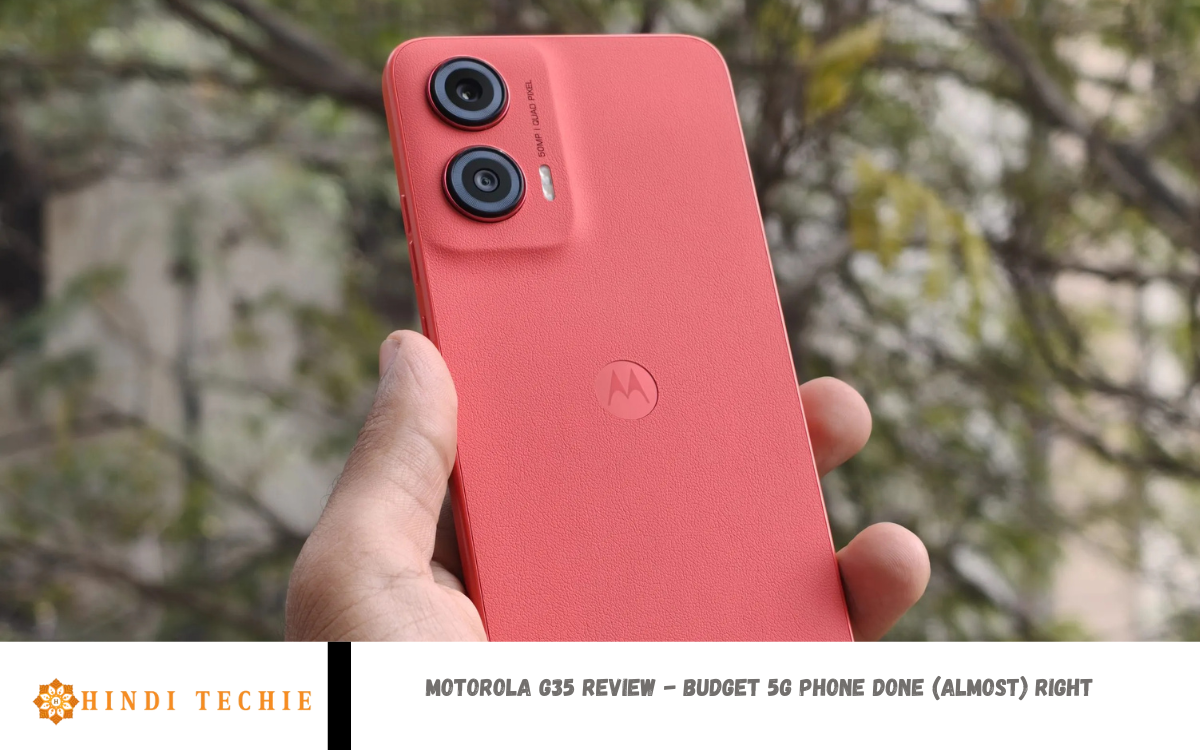
In a world where smartphones are getting more expensive every year, Motorola continues to stand out by offering solid devices at wallet-friendly prices. The Motorola G35 is the brand’s latest attempt to bring 5G connectivity to the budget segment without cutting too many corners—and for the most part, it succeeds.
Priced affordably, the G35 packs a decent set of features: a clean Android experience, a large display, reliable battery life, and, of course, 5G support. It’s designed for users who want the basics done well—browsing, social media, video streaming, and light gaming—without breaking the bank. While it’s not without its compromises, like modest camera performance and a plastic build, the G35 delivers where it matters most.
This review examines the Motorola G35’s strengths and weaknesses to help you decide if it’s the proper budget 5G phone for you. Whether you’re a student, a casual user, or just looking for a dependable backup device, the G35 might be the sweet spot between price and performance. Let’s explore what makes this phone (almost) right for the budget-conscious buyer.
Design and Build Quality: How Does the G35 Feel in Hand?
The Motorola Moto G35 5G impresses with its thoughtful design and solid build quality, especially considering its budget-friendly price point. Available in vibrant colors like Guava Red, Leaf Green, and Midnight Black, the device offers a choice between a vegan leather finish and a glossy plastic back. The vegan leather variant not only adds a premium touch but also enhances grip and resists fingerprints, making it comfortable to hold and use throughout the day.
Weighing around 191g and measuring just 7.79mm in thickness, the Moto G35 feels lightweight and sleek in hand. Its tall and slim profile ensures ease of use, allowing fingers to reach across the screen without strain. The device also features Corning Gorilla Glass 3 protection on the front, offering added durability against scratches and minor drops.
Additional design elements include a side-mounted fingerprint scanner integrated into the power button, a 3.5mm headphone jack, and stereo speakers with Dolby Atmos support, enhancing the overall user experience. Moreover, the Moto G35 boasts an IP52 water-repellent design, providing some resistance against accidental splashes.
Display – Big Screen, Basic Experience
The Motorola G35 5G features a 6.5-inch IPS LCD that offers a decent visual experience for everyday use. With an HD+ resolution (1600 x 720 pixels), it may not match the sharpness of Full HD panels. Still, it’s acceptable for browsing, watching videos, and scrolling social media—especially at this price point.
One of the key highlights is the 120Hz refresh rate, which adds smoothness to animations and scrolling. This is a rare find in budget smartphones and makes the G35 feel snappier during general use. However, the screen’s brightness levels are average, which means visibility in direct sunlight might not always be ideal.
Color reproduction is pretty neutral, leaning slightly toward cooler tones. It’s not the most vibrant display, but it gets the job done for essential media consumption and gaming. The bezels are reasonably slim, with a small punch-hole cutout for the front camera, giving it a modern look.
Performance: Can It Handle Daily Tasks Smoothly?
The Motorola G35 5G is powered by the MediaTek Dimensity 6100+ chipset, paired with up to 6GB of RAM and 128GB of internal storage. This combination is built to handle day-to-day tasks like calling, texting, web browsing, social media use, and video streaming without significant hiccups.
In regular use, the G35 feels responsive enough—apps open in a reasonable time, multitasking is pretty smooth, and the 120Hz refresh rate helps make everything feel quicker. For casual users, the experience is more than acceptable. Light games like Subway Surfers or Candy Crush run well, but more demanding titles such as Call of Duty: Mobile or PUBG will require lower graphics settings and may still show occasional lag.
Where the G35 really shines is its clean software. With a near-stock Android 14 experience and minimal bloatware, the phone runs smoothly and feels lighter compared to other budget devices that come overloaded with custom skins and unnecessary apps.
Read Also: Tecno Phantom V Fold 2 review – Promising foldable but far from benchmark
Software – Clean Android, No Bloatware
One of the standout features of the Motorola G35 5G is its software experience. It runs on Android 14 with Motorola’s light MyUX skin, which stays very close to stock Android. This means you get a clean, clutter-free interface without unnecessary pre-installed apps (aka bloatware) slowing things down or taking up storage space.
The UI is simple, smooth, and intuitive—ideal for users who prefer a straightforward smartphone experience. Motorola also adds a few useful features like Moto Gestures (e.g., chop twice for flashlight, twist to open the camera), which enhance usability without overwhelming users with options.
Unlike many budget phones that come loaded with ads or pushy notifications, the G35 keeps things clean and focused. This not only improves performance but also gives the software a more premium feel.
5G Connectivity – Budget Meets Future-Ready
The Motorola G35 5G brings next-gen connectivity to the budget segment, making it a future-ready choice for price-conscious buyers. Powered by the MediaTek Dimensity 6100+ chipset, the phone supports dual 5G SIMs, allowing you to enjoy faster internet speeds, lower latency, and smoother streaming where 5G networks are available.
For users in areas with good 5G coverage, this means quicker downloads, buffer-free video calls, and improved app responsiveness. Even if you’re not in a 5G zone yet, the G35 still performs well on 4G networks, so you’re covered both now and in the future.
Motorola has also ensured a stable and reliable network experience with good call quality and consistent connectivity during day-to-day use. Whether you’re working remotely, streaming on the go, or just browsing the web, the G35 handles network tasks with ease.
Frequently Asked Questions
What is the battery life like?
It packs a 5,000mAh battery, which easily lasts a whole day with regular use. A 20W fast charger supports charging.
How is the camera performance?
The camera setup is essential, with a 50MP primary sensor. It takes good photos in daylight but struggles in low light or night conditions.
Does the Moto G35 have stock Android?
Yes, it runs near-stock Android 14 with minimal customizations and no annoying bloatware or ads.
Is there a fingerprint scanner?
Yes, the fingerprint scanner is side-mounted on the power button and works reliably.
Is the Motorola G35 worth buying?
If you’re looking for an affordable 5G phone with a clean Android experience and decent performance, the Moto G35 is an excellent value for money—just don’t expect flagship-level specs.
Conclusion
The Motorola G35 5G is a solid contender in the budget smartphone segment, offering many features that matter most to everyday users. With its smooth 120Hz display, clean Android 14 software, dependable performance, and reliable 5G connectivity, it checks most boxes for a practical and affordable phone in 2025. While it doesn’t excel in areas like camera quality or premium build materials, these compromises are understandable, given the price point.